


You will not be allowed to compare more than 4 products at a time
View compareTAIFU 13.2V 2.82A Battery Charger for DJI Mavic Air 2S & 2, Black, Includes Power Supply Cord & USB Port
TAIFU 13.2V 2.82A Battery Charger for DJI Mavic Air 2S & 2, Black, Includes Power Supply Cord & USB Port
Regular price
$61.95 USD
Sale price
$61.95 USD
Regular price
$88.50 USD
Unit price
per
Shipping calculated at checkout.
Hurry! Only left 5 in stock
Sold by ToyTooth — Your trusted kids' toy store.
Returns accepted within 30 days | support@toytooth.com
Shipping Information
- Shipping calculated at checkout
- Processing Time: 3–5 business days
- Estimated Delivery: 6–10 business days after dispatch
- Securely packed to ensure your purchase arrives in perfect condition
- Tracking number sent via email once dispatched
Returns & Refund
Returns accepted within 30 days of delivery.
Damaged or Defective Item
Free return shipping + replacement or full refund
Wrong Item Received
Free return shipping + replacement or full refund
Change of Mind
Return shipping at customer's expense · Item must be unused & in original packaging
All returns require a Return Authorization (RA) number before sending.
View Full Return & Refund Policy
Safety & Compliance
⚠️
California Proposition 65 Warning
Some products sold on this website may expose you to chemicals known to the State of California to cause cancer, birth defects, or other reproductive harm.
www.P65Warnings.ca.gov
🛒
General Product Safety Advisory
Always read the product label, instructions, and safety warnings before use. Do not use damaged or modified products. Store products in appropriate conditions as specified by the manufacturer.
Keep all products out of reach of children unless specifically designed for their use.
ℹ️
Product Authenticity & Notice
All products sold by ToyTooth are 100% authentic, sourced directly from trusted toy suppliers and brands. Product colors and dimensions may vary slightly from images due to screen calibration and manufacturing tolerances.
ToyTooth — Fun Toys for Every Kid, Delivered to Your Door.
Share
Couldn't load pickup availability
Guarantee safe and secure checkout
Description
Description
The TAIFU DC Adapter is a reliable charger designed specifically for DJI Mavic Air 2 and DJI Air 2S drones. This versatile charger not only powers your drone but also features a USB port, making it an ideal solution for charging various devices, including smartphones and tablets.
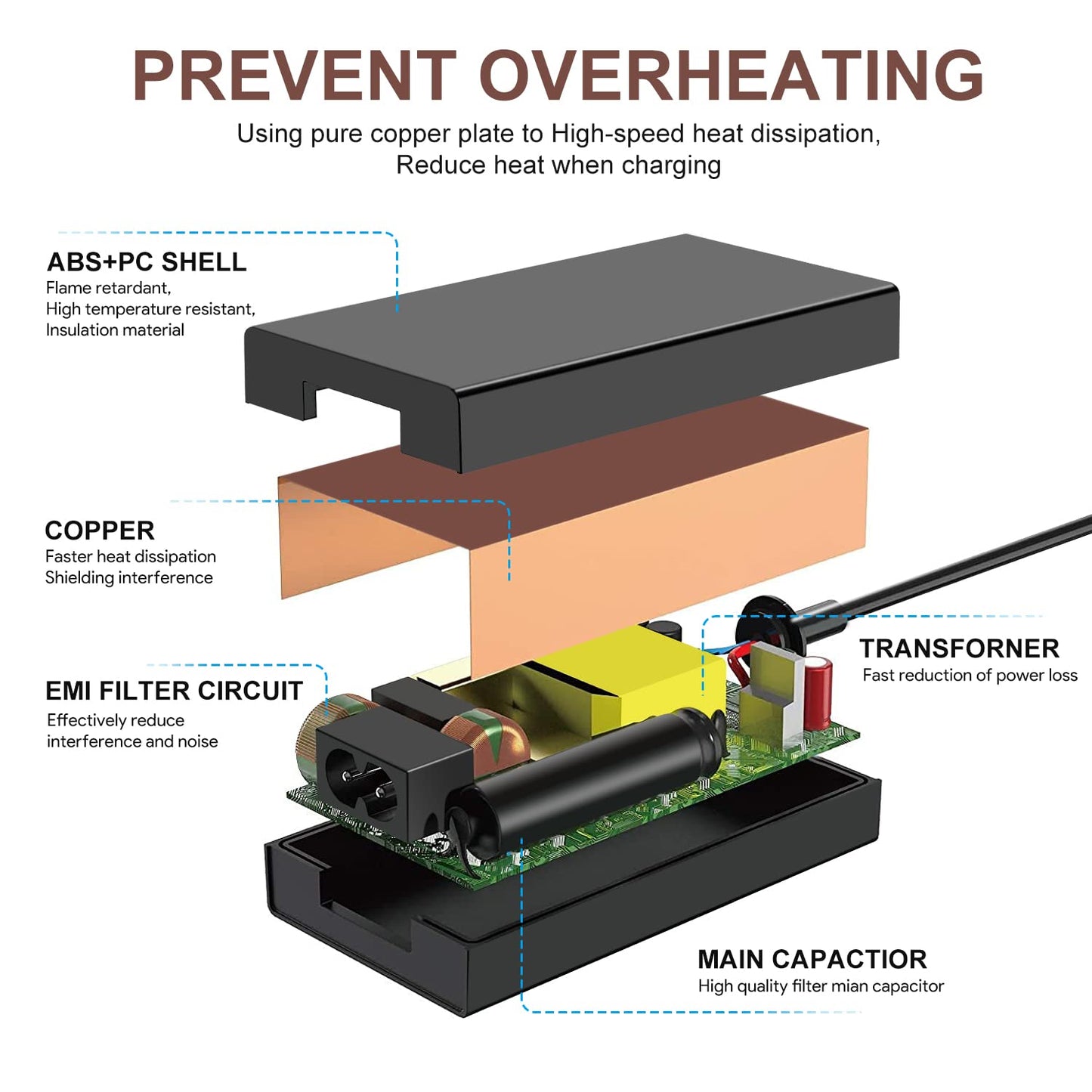
Constructed with high-quality components, the TAIFU charger operates within an input voltage range of 100-240V and delivers a steady output of 13.2V. It is built to ensure safety and efficiency, featuring multiple protection mechanisms. The sleek black design is both durable and aesthetically pleasing, making it a perfect addition to your drone accessories.
Key Features:- 3-Year Warranty: Enjoy peace of mind with a comprehensive warranty that covers defects and ensures long-term use.
- Wide Compatibility: Compatible with DJI Mavic Air 2, DJI Air 2S, and various DJI battery models, ensuring you have the right power solution for your devices.
- Advanced Safety Features: Equipped with over-voltage, over-load, and short-circuit protections to safeguard your equipment during charging.
- USB Charging Port: Features a 5V 2A USB port, allowing you to charge smartphones and tablets alongside your drone batteries.
- Efficient Performance: Delivers a reliable 13.2V output, ensuring your drone batteries charge quickly and effectively for optimal performance.
- Compact Design: Lightweight and portable, making it easy to carry during travels or outdoor activities with your drone.
- Certified Quality: CE, FCC, and RoHS certified to meet industry standards, ensuring safe and reliable operation.
The TAIFU DC Adapter is an excellent choice for drone enthusiasts and professionals who prioritize safety, efficiency, and compatibility. Its robust construction and thoughtful design make it a valuable addition to your DJI accessories. With the ability to charge both your drone and other devices, this charger is tailored for those who require dependable performance and convenience on all their aerial adventures.


Frequently Asked Questions
- Q: What is the output voltage of the TAIFU battery charger? A: The output voltage of the TAIFU battery charger is thirteen point two volts. This voltage is specifically designed for charging the DJI Mavic Air 2 and Air 2S batteries.
- Q: What type of devices is this battery charger compatible with? A: This battery charger is compatible with DJI Mavic Air 2 and Air 2S drones. It can also charge the DJI Mavic Air 2 drone's remote control.
- Q: Does this charger come with a warranty? A: Yes, this charger comes with a three-year warranty. Additionally, it offers a three-month money-back guarantee for customer satisfaction.
- Q: What are the input voltage specifications for this charger? A: The input voltage specifications for this charger range from one hundred to two hundred forty volts. It operates on a frequency of fifty to sixty Hertz.
- Q: What safety features does the TAIFU battery charger include? A: The TAIFU battery charger includes over-voltage, over-load, and short-circuit protection. These features ensure safe charging for your devices.
- Q: How do I use the TAIFU battery charger? A: To use the TAIFU battery charger, simply connect it to a power outlet and plug in your DJI Mavic Air 2 or Air 2S battery. Ensure that the connections are secure for effective charging.
- Q: Can I charge my smartphone with this battery charger? A: Yes, you can use the five-volt USB port on this battery charger to charge smartphones and tablets. The USB port provides two amps of power.
- Q: Is this charger suitable for the DJI Mavic 2 series? A: No, this charger is not suitable for the DJI Mavic 2 series. It is specifically designed for the Mavic Air 2 and Air 2S models.
- Q: How should I store the battery charger when not in use? A: When not in use, store the charger in a cool, dry place away from direct sunlight. Ensure that it is unplugged for safety.
- Q: What should I do if the charger gets hot during use? A: If the charger gets very hot while plugged in, stop using it immediately. Disconnect it from the power source and contact customer support for assistance.
- Q: How do I clean the TAIFU battery charger? A: To clean the battery charger, use a soft, dry cloth to wipe the exterior. Avoid using any liquids or abrasive materials that could damage the unit.
- Q: What is the maximum output current of this charger? A: The maximum output current of this charger is two point eighty-two amps. This ensures efficient charging of the drone batteries.
- Q: Does this product include an instruction manual? A: Yes, the package includes an instruction manual. It provides guidance on how to use the charger safely and effectively.
- Q: What is the color of the TAIFU battery charger? A: The TAIFU battery charger is black in color. Its sleek design complements various home and travel settings.
- Q: What should I do if my charger arrives damaged? A: If your charger arrives damaged, please contact customer support immediately. They will assist you with a replacement or return process.