


You will not be allowed to compare more than 4 products at a time
View compareCanon 0651C002 ImageFORMULA DR-C240 Office Document Scanner
Canon 0651C002 ImageFORMULA DR-C240 Office Document Scanner
Regular price
$1,038.07 USD
Sale price
$1,038.07 USD
Regular price
$1,038.07 USD
Unit price
per
Shipping calculated at checkout.
Out of stock
Sold by ToyTooth — Your trusted kids' toy store.
Returns accepted within 30 days | support@toytooth.com
Shipping Information
- Free Shipping Across the USA
- Processing Time: 3–5 business days
- Estimated Delivery: 6–10 business days after dispatch
- Securely packed to ensure your purchase arrives in perfect condition
- Tracking number sent via email once dispatched
Returns & Refund
Returns accepted within 30 days of delivery.
Damaged or Defective Item
Free return shipping + replacement or full refund
Wrong Item Received
Free return shipping + replacement or full refund
Change of Mind
Return shipping at customer's expense · Item must be unused & in original packaging
All returns require a Return Authorization (RA) number before sending.
View Full Return & Refund Policy
Safety & Compliance
⚠️
California Proposition 65 Warning
Some products sold on this website may expose you to chemicals known to the State of California to cause cancer, birth defects, or other reproductive harm.
www.P65Warnings.ca.gov
🛒
General Product Safety Advisory
Always read the product label, instructions, and safety warnings before use. Do not use damaged or modified products. Store products in appropriate conditions as specified by the manufacturer.
Keep all products out of reach of children unless specifically designed for their use.
ℹ️
Product Authenticity & Notice
All products sold by ToyTooth are 100% authentic, sourced directly from trusted toy suppliers and brands. Product colors and dimensions may vary slightly from images due to screen calibration and manufacturing tolerances.
ToyTooth — Fun Toys for Every Kid, Delivered to Your Door.
Share
Couldn't load pickup availability
Guarantee safe and secure checkout
Description
Description
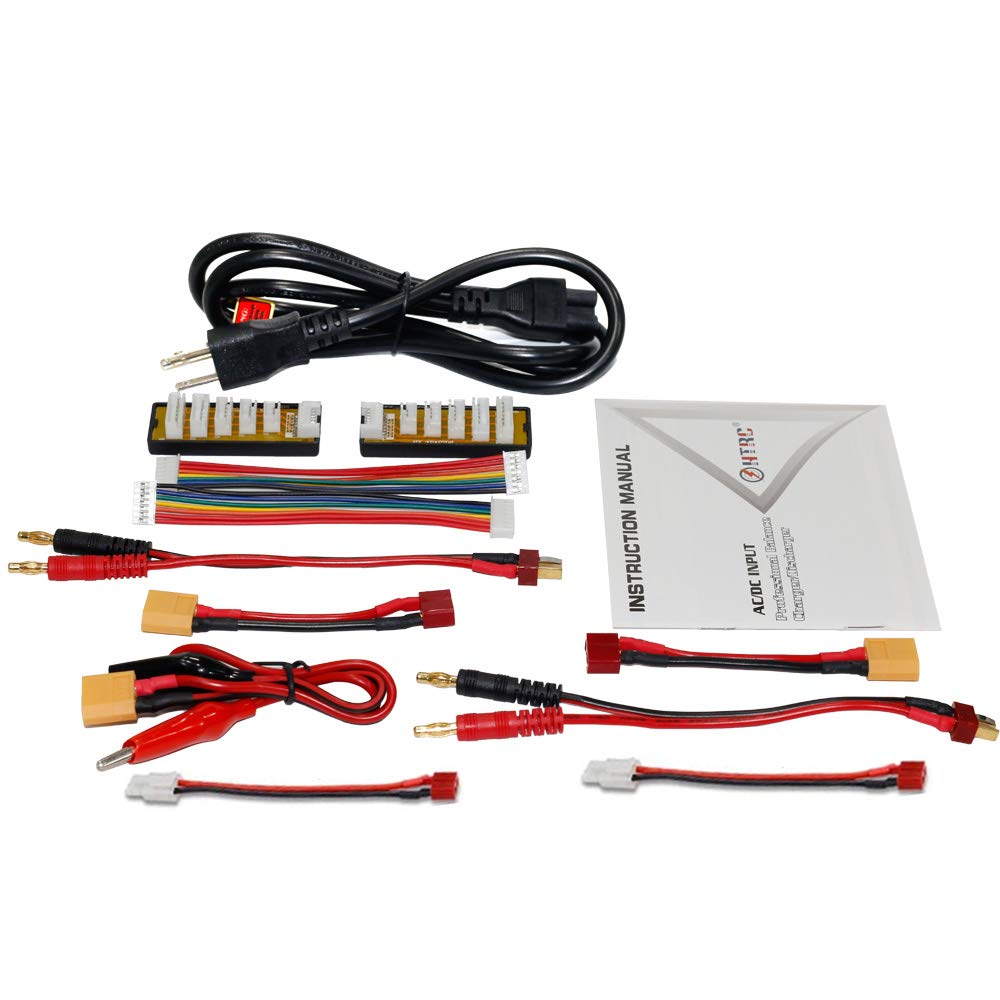
Features: *Twin-channel,charge two different kinds of batteries simultaneously. *Automatic identification of Li-Po batteries cells counts *Multiple charging modes. -Lipo/Lilo/LiFe/LiHv: balance charge, charge, fast charge,storage, discharge. -NiMH/NiCd: Charge, Discharge, Cycle. -PB: Charge,Discharge,Trickle. *Multi-extra function: -Battery Meter:Display lithium battery cell counts, total voltage, battery capacity percentage,each cell's voltage. (does not support 1s battery) -TVC(Terminal voltage control):The Charger allows user to set the charge/discharge end voltage. -Lithium Battery internal Resistance Check: can display each cell's resistance.(does not support 1s battery) -Balancer: individual-cell-voltage balancing,cell voltage Monitoring -Smart battery:Smart battery I,II,III,and Digital DC Power.(Need optional DJI Charging cable) Specification: Model No:HT-0098 Input: AC 100-240V / DC 11-18V Charge power: AC mode 150W (CH1+CH2=150Watt),DC mode 120W*2 =240W Discharge power:10W*2 Charge current range:0.1-10A *2 Discharge current range:0.1-2A*2 Lilon/LiPo/LiFe/LiHV cell count :1-6cells*2 NiCd/NiMH battery cell count:1-15cells*2 PB Battery voltage:2-20V*2 Smart battery:I/II/III*2 Current drain for balancing: 500mA/cell Net Weight:0.48kg Dimension:145*105*64mm Gross weight:0.9kg Package size:215*155*75mm Package list: 1x HTRC C240 Dual Lipo Balance Charger 1x AC Cord 1x DC Cord 1x User's Manual 2x Charge cable banana plug to T-Plug 2x Extension charge cable T-Plug to XT60 2x balance board with pin cord


Frequently Asked Questions
- Q: What are the dimensions of the Canon ImageFORMULA DR-C240 scanner? A: The dimensions are nine inches by eleven point four inches by nine point nine inches. This compact size makes it suitable for various office environments.
- Q: What is the maximum scanning speed of this document scanner? A: The maximum scanning speed is forty-five pages per minute. This allows for efficient processing of large volumes of documents.
- Q: What file formats can the Canon DR-C240 output scanned images in? A: The scanner can output images in multiple file formats. This flexibility ensures compatibility with various applications and storage solutions.
- Q: How do I set up the Canon ImageFORMULA DR-C240 scanner? A: To set up the scanner, connect it to your computer using the USB cable and install the provided software. Follow the on-screen instructions for configuration.
- Q: Can the Canon DR-C240 scan both sides of a document at once? A: Yes, it can scan both sides of a document in a single pass. This feature enhances efficiency and reduces scanning time.
- Q: Is the Canon DR-C240 suitable for home office use? A: Yes, it is suitable for home office use. Its compact size and efficient scanning capabilities make it ideal for small to medium-scale document management.
- Q: What should I do to maintain the Canon ImageFORMULA DR-C240 scanner? A: To maintain the scanner, regularly clean the scanning glass and rollers. This ensures optimal performance and longevity of the device.
- Q: Is there a warranty for the Canon DR-C240 scanner? A: Yes, there is a warranty included with the purchase. Please check the specific warranty details provided by the manufacturer.
- Q: How do I troubleshoot scanning issues with the Canon DR-C240? A: If you encounter scanning issues, ensure the scanner is properly connected and the drivers are installed. Restart the device and check for any paper jams.
- Q: Can I use the Canon DR-C240 with third-party software? A: Yes, it is compatible with third-party software through ISIS/TWAIN drivers. This allows for seamless integration into existing workflows.
- Q: What types of documents can I scan with the Canon DR-C240? A: You can scan various document types, including receipts, business cards, and legal-sized papers. Its versatility makes it suitable for different scanning needs.
- Q: How portable is the Canon ImageFORMULA DR-C240? A: The scanner is relatively portable due to its compact dimensions. It can easily fit on a desk or be moved to different locations as needed.
- Q: Does the Canon DR-C240 have features to enhance text legibility? A: Yes, it includes character emphasis and text enhancement features. These functions help improve the clarity of hard-to-read documents.
- Q: Is the Canon ImageFORMULA DR-C240 easy to operate? A: Yes, it features an easy-to-use operation panel with accessible controls. You can quickly start scanning operations and configure tasks.
- Q: What connectivity options does the Canon DR-C240 offer? A: The scanner connects via USB. This standard connection makes it easy to set up with most computers.
- Q: Can I route scanned images to cloud applications with the Canon DR-C240? A: Yes, the CaptureOnTouch software allows routing scanned images directly to cloud applications like Evernote and Google Docs. This enhances document management capabilities.