


You will not be allowed to compare more than 4 products at a time
View compareEF ELECFREAKS Cutebot Microbit Car Kit - DIY Programmable Robot, STEM Project, Compatible with BBC Micro:bit V1/V2, Plastic Material
EF ELECFREAKS Cutebot Microbit Car Kit - DIY Programmable Robot, STEM Project, Compatible with BBC Micro:bit V1/V2, Plastic Material
Regular price
$41.27 USD
Sale price
$41.27 USD
Regular price
$41.27 USD
Unit price
per
Shipping calculated at checkout.
Out of stock
Sold by ToyTooth — Your trusted kids' toy store.
Returns accepted within 30 days | support@toytooth.com
Shipping Information
- Free Shipping Across the USA
- Processing Time: 3–5 business days
- Estimated Delivery: 6–10 business days after dispatch
- Securely packed to ensure your purchase arrives in perfect condition
- Tracking number sent via email once dispatched
Returns & Refund
Returns accepted within 30 days of delivery.
Damaged or Defective Item
Free return shipping + replacement or full refund
Wrong Item Received
Free return shipping + replacement or full refund
Change of Mind
Return shipping at customer's expense · Item must be unused & in original packaging
All returns require a Return Authorization (RA) number before sending.
View Full Return & Refund Policy
Safety & Compliance
⚠️
California Proposition 65 Warning
Some products sold on this website may expose you to chemicals known to the State of California to cause cancer, birth defects, or other reproductive harm.
www.P65Warnings.ca.gov
🛒
General Product Safety Advisory
Always read the product label, instructions, and safety warnings before use. Do not use damaged or modified products. Store products in appropriate conditions as specified by the manufacturer.
Keep all products out of reach of children unless specifically designed for their use.
ℹ️
Product Authenticity & Notice
All products sold by ToyTooth are 100% authentic, sourced directly from trusted toy suppliers and brands. Product colors and dimensions may vary slightly from images due to screen calibration and manufacturing tolerances.
ToyTooth — Fun Toys for Every Kid, Delivered to Your Door.
Share
Couldn't load pickup availability
Guarantee safe and secure checkout
Description
Description
The ELECFREAKS Cutebot Micro:bit Car is a smart, educational coding robot designed to inspire creativity and learning in programming. Ideal for beginners, this interactive car offers a hands-on approach to understanding coding concepts through fun and engaging activities.
Constructed from durable plastic, the Cutebot features a rear-drive system powered by dual high-speed motors, ensuring robust performance. Its compact and cute design makes it easy to hold, while the integration of various onboard sensors, including an ultrasonic sensor and distance sensor, enhances its capabilities. The Cutebot is equipped with two RGB LED headlights, clearance lamps, line-tracking probes, and an active buzzer, providing an exciting platform for learning and experimentation. Note that the package does not include the Micro:bit board or AAA battery.
Key Features:- Compact Design: The Cutebot's simple color matching and mini size make it visually appealing and portable.
- Powerful Performance: Features a dual-speed motor that delivers strong power for a variety of coding projects.
- Educational Programming: Offers rich graphical programming blocks that help beginners learn coding from basic to advanced levels.
- Extensive Compatibility: Includes extension ports for sensors and building blocks, allowing for expanded experimentation and creativity.
- Comprehensive Learning Resources: Access to tutorial blogs and videos on the wiki site to enhance the learning experience.
- Strong Technical Support: Reliable customer support available through the official ELECFREAKS Amazon store for any inquiries.
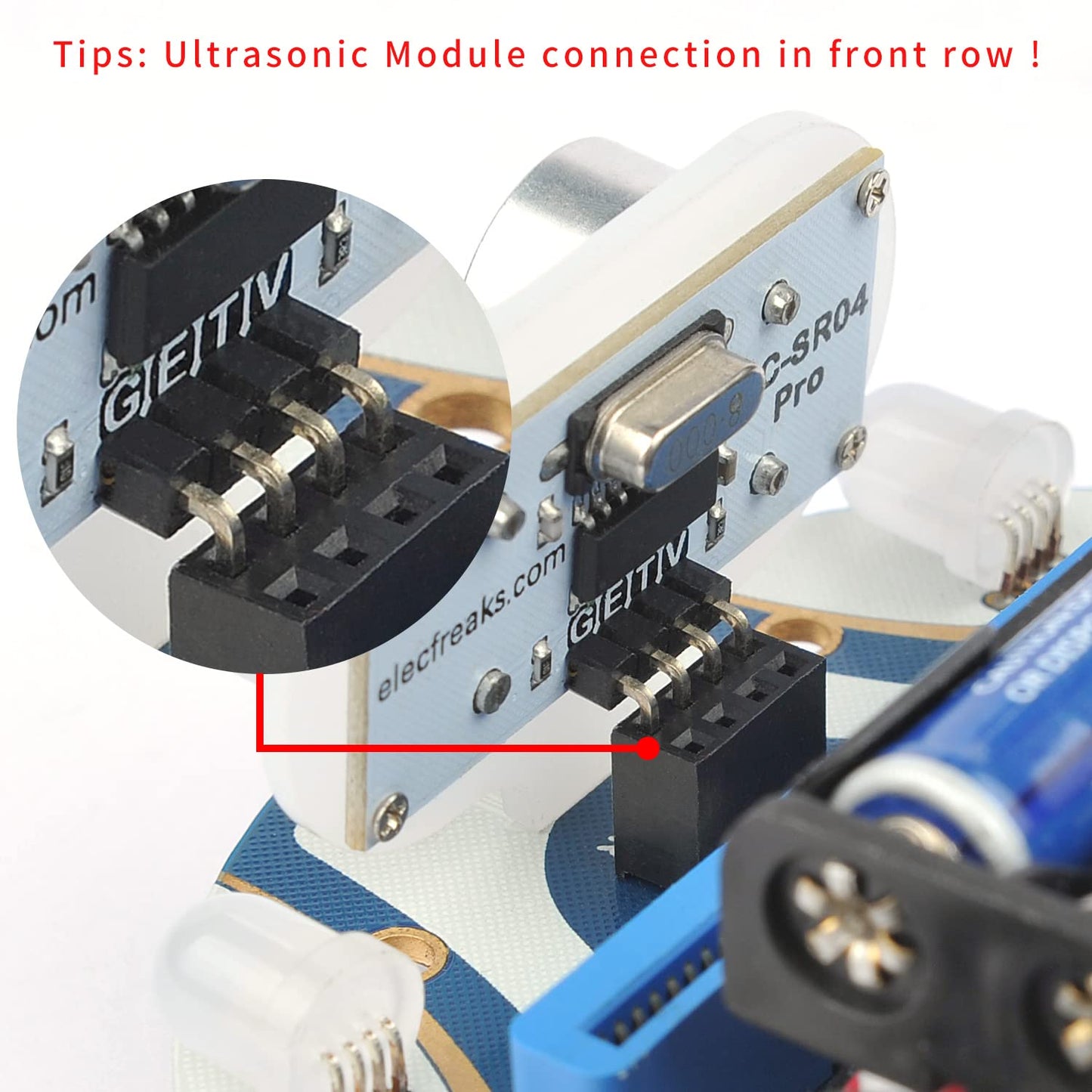
- Safety Note: Designed for educational use; the ultrasonic module must be correctly plugged in to ensure proper operation.
The ELECFREAKS Cutebot Micro:bit Car is perfect for educators, parents, and students looking to explore the world of coding and robotics. It provides a practical and enjoyable way to learn programming skills, making it an excellent addition to any educational toolkit. With its engaging features and supportive resources, the Cutebot is designed to foster a love for learning in technology and engineering.


Frequently Asked Questions
- Q: What materials is the ELECFREAKS microbit Mini Cutebot made of? A: The ELECFREAKS microbit Mini Cutebot is primarily made of plastic. This ensures durability while keeping the car lightweight and easy to handle.
- Q: What are the dimensions of the Cutebot? A: The Cutebot measures three point four inches in length, one point three four inches in width, and one point five seven inches in height. These compact dimensions make it ideal for small spaces.
- Q: What is included in the Cutebot kit? A: The kit includes one Cutebot car, one AAA battery holder, one HC-SR04 ultrasonic sensor, one line-tracking map, and one brochure. Note that the micro:bit board and AAA batteries are not included.
- Q: How do I program the ELECFREAKS Cutebot? A: You can program the Cutebot using graphical programming blocks designed for micro:bit. This allows beginners to learn programming concepts progressively.
- Q: Is the Cutebot suitable for beginners? A: Yes, the Cutebot is designed for beginners. Its graphical programming interface makes it easy to understand coding fundamentals and create fun projects.
- Q: Can I use other sensors with the Cutebot? A: Yes, the Cutebot has a three-pin port for additional sensors. This allows users to expand their projects and experiments beyond the standard configuration.
- Q: How do I care for the Cutebot? A: To keep the Cutebot in good condition, avoid exposing it to moisture and store it in a cool, dry place. Regularly check connections for secure fit.
- Q: Is the Cutebot safe for children? A: Yes, the Cutebot is safe for children when used under adult supervision. It is designed with educational purposes in mind, promoting STEM learning.
- Q: What should I do if the Cutebot does not run? A: If the Cutebot does not run, ensure that the ultrasonic module is plugged into the front port and check the battery connections. Refer to the included brochure for troubleshooting tips.
- Q: What kind of projects can I create with the Cutebot? A: With the Cutebot, you can create various projects such as distance tracking, obstacle avoidance, and line following. These projects enhance coding and robotics skills.
- Q: How do I connect the micro:bit to the Cutebot? A: To connect the micro:bit to the Cutebot, simply insert the micro:bit board into the designated slot on the Cutebot. Ensure it is securely fitted for proper operation.
- Q: Is there customer support available for the Cutebot? A: Yes, customer support is available. You can contact the EF ELECFREAKS store on Amazon for assistance or to ask questions regarding your Cutebot.
- Q: Can I use building blocks with the Cutebot? A: Yes, the Cutebot is compatible with building blocks. This allows users to enhance their creativity and create unique designs while learning programming.
- Q: What is the maximum weight the Cutebot can carry? A: The Cutebot is designed for light payloads typical of educational projects, but specific weight limits are not provided. Avoid overloading to ensure optimal performance.
- Q: Where can I find tutorials for the Cutebot? A: Tutorials for the Cutebot can be found on the Elecfreaks wiki website. This resource offers guides, learning materials, and project ideas.