


You will not be allowed to compare more than 4 products at a time
View compareGudoqi Piggy Bank, Electronic Money Bank, Safe Mini Atm Cash Coin Can, Auto Scroll Paper Money Saving Box, Great Birthday Gifts For Kids, Gold
Gudoqi Piggy Bank, Electronic Money Bank, Safe Mini Atm Cash Coin Can, Auto Scroll Paper Money Saving Box, Great Birthday Gifts For Kids, Gold
Regular price
$22.72 USD
Sale price
$22.72 USD
Regular price
$22.72 USD
Unit price
per
Shipping calculated at checkout.
Out of stock
Sold by ToyTooth — Your trusted kids' toy store.
Returns accepted within 30 days | support@toytooth.com
Shipping Information
- Free Shipping Across the USA
- Processing Time: 3–5 business days
- Estimated Delivery: 6–10 business days after dispatch
- Securely packed to ensure your purchase arrives in perfect condition
- Tracking number sent via email once dispatched
Returns & Refund
Returns accepted within 30 days of delivery.
Damaged or Defective Item
Free return shipping + replacement or full refund
Wrong Item Received
Free return shipping + replacement or full refund
Change of Mind
Return shipping at customer's expense · Item must be unused & in original packaging
All returns require a Return Authorization (RA) number before sending.
View Full Return & Refund Policy
Safety & Compliance
⚠️
California Proposition 65 Warning
Some products sold on this website may expose you to chemicals known to the State of California to cause cancer, birth defects, or other reproductive harm.
www.P65Warnings.ca.gov
🛒
General Product Safety Advisory
Always read the product label, instructions, and safety warnings before use. Do not use damaged or modified products. Store products in appropriate conditions as specified by the manufacturer.
Keep all products out of reach of children unless specifically designed for their use.
ℹ️
Product Authenticity & Notice
All products sold by ToyTooth are 100% authentic, sourced directly from trusted toy suppliers and brands. Product colors and dimensions may vary slightly from images due to screen calibration and manufacturing tolerances.
ToyTooth — Fun Toys for Every Kid, Delivered to Your Door.
Share
Couldn't load pickup availability
Guarantee safe and secure checkout
Description
Description
Notice:
1. Please Make Sure The Battery Has Enough Power Before Using
2. Please Make Sure Every Time Press The Digital Button, You Will Hear The Sound Like ''Du'' Sound Or ''Password Please''. Otherwise The Product May Not Sensor The Number You Input, Which May Cause You Can'T Open The Door Or Reset The Password. In This Situation, You Need To Press The Button Again
Two Mode:
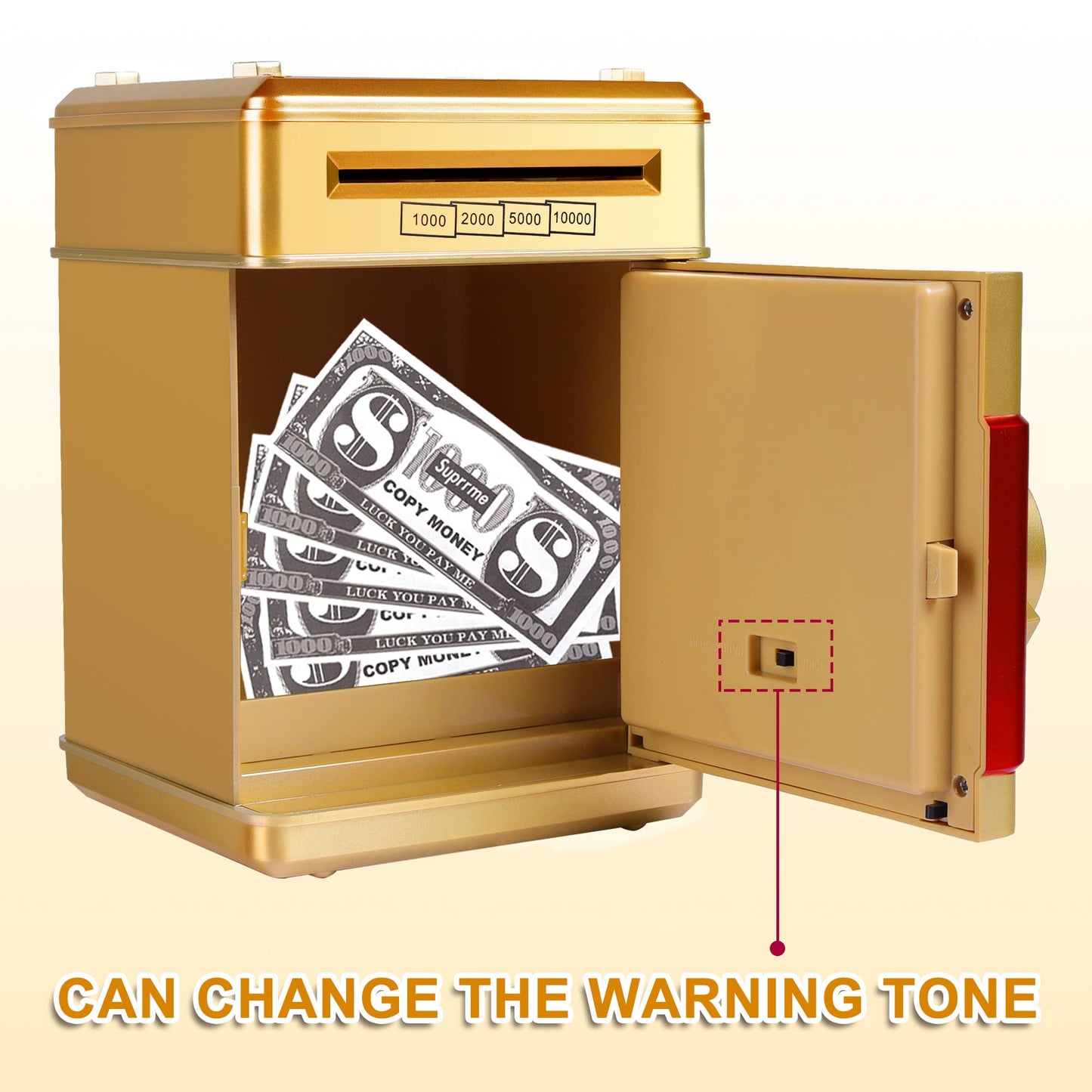
1. There Is A Button Inside The Door For Two Modes Choosing
2. In ''Beeps Sound'' Mode, When You Press The Digital Button You Will Hear The Sound Like ''Du''. If The Password Is Wrong, You Will Hear The Sound Like ''Oh''
3. In ''Voice'' Mode, When You Press The Digital Button You Will Hear The Sound Like ''Password Please''. If The Password Is Wrong, You Will Hear The Sound Like ''Oh Sorry, Please Try Again''
4. If You Don'T Like The Music Or The Sound Is Too Loud For You, We Suggest You Choose The Beeps Sound Mode
How To Open The Door:
1. Input The Correct Password, The Green Light Will On
2. Clockwise Rotating The Door Knob To Open The Door
3. After You Open The Door, You Will Hear Beep Sound Every 20 Seconds Until Closing The Door
How To Reset Password:
1. Enter The Current Password To Open The Safe Door
2. Hold The '*' Button, Both Green And Red Lights Will Flash
3. Enter New 4-Digit Password Within 15 Seconds Then Press '#' To Confirm And Save New Password. Light Will Stop Flashing
4. Release The '*' Button And Close The Door
5. If You Don'T Enter New Password Within 15 Seconds The Procedure Will Stop. You Need To Restart It
Package Including:
1 X Password Piggy Bank
1 X User Manual
1. Please Make Sure The Battery Has Enough Power Before Using
2. Please Make Sure Every Time Press The Digital Button, You Will Hear The Sound Like ''Du'' Sound Or ''Password Please''. Otherwise The Product May Not Sensor The Number You Input, Which May Cause You Can'T Open The Door Or Reset The Password. In This Situation, You Need To Press The Button Again
Two Mode:
1. There Is A Button Inside The Door For Two Modes Choosing
2. In ''Beeps Sound'' Mode, When You Press The Digital Button You Will Hear The Sound Like ''Du''. If The Password Is Wrong, You Will Hear The Sound Like ''Oh''
3. In ''Voice'' Mode, When You Press The Digital Button You Will Hear The Sound Like ''Password Please''. If The Password Is Wrong, You Will Hear The Sound Like ''Oh Sorry, Please Try Again''
4. If You Don'T Like The Music Or The Sound Is Too Loud For You, We Suggest You Choose The Beeps Sound Mode
How To Open The Door:
1. Input The Correct Password, The Green Light Will On
2. Clockwise Rotating The Door Knob To Open The Door
3. After You Open The Door, You Will Hear Beep Sound Every 20 Seconds Until Closing The Door
How To Reset Password:
1. Enter The Current Password To Open The Safe Door
2. Hold The '*' Button, Both Green And Red Lights Will Flash
3. Enter New 4-Digit Password Within 15 Seconds Then Press '#' To Confirm And Save New Password. Light Will Stop Flashing
4. Release The '*' Button And Close The Door
5. If You Don'T Enter New Password Within 15 Seconds The Procedure Will Stop. You Need To Restart It
Package Including:
1 X Password Piggy Bank
1 X User Manual


Frequently Asked Questions
- Q: What materials is the GuDoQi Piggy Bank made of? A: The GuDoQi Piggy Bank is made of durable ABS plastic. This material ensures sturdiness and safety for children.
- Q: What are the dimensions of this piggy bank? A: The dimensions of the GuDoQi Piggy Bank are five point seven one inches in length, five point seven one inches in width, and seven point eight seven inches in height.
- Q: How many coins can this piggy bank hold? A: The piggy bank can hold up to six hundred coins. This high capacity encourages children to save money effectively.
- Q: How do you use the GuDoQi Piggy Bank? A: To use the piggy bank, insert the banknotes into the reel opening and coins into the top slot. The piggy bank will automatically roll in the banknotes.
- Q: Is there a password feature for this piggy bank? A: Yes, the GuDoQi Piggy Bank requires a four-digit password for access. The default password is zero zero zero zero.
- Q: Can I reset the password on this piggy bank? A: Yes, you can reset the password by entering the current password and following simple instructions. The process takes place within fifteen seconds.
- Q: How should I care for the GuDoQi Piggy Bank? A: To maintain the piggy bank, avoid exposing it to moisture and clean it with a dry cloth. This will ensure its longevity.
- Q: What type of batteries does the piggy bank require? A: The GuDoQi Piggy Bank requires three AA batteries, which are not included in the package.
- Q: Is this piggy bank safe for children? A: Yes, the piggy bank is made from non-toxic materials and has passed multiple safety tests, making it safe for kids.
- Q: Can adults use this piggy bank as well? A: Yes, while designed for children, adults can use the piggy bank for personal saving or as a decorative item.
- Q: How do I store the piggy bank when not in use? A: When not in use, store the piggy bank in a cool, dry place away from direct sunlight to prevent damage.
- Q: What if my piggy bank doesn't work after inserting the batteries? A: If the piggy bank doesn’t work, ensure the batteries are installed correctly and have enough power. If issues persist, consult the user manual.
- Q: Is there a warranty for the GuDoQi Piggy Bank? A: Yes, the piggy bank typically comes with a manufacturer's warranty. Check the package for specific details.
- Q: What happens if I forget the password? A: If you forget the password, you can reset it by removing the batteries for over fifteen minutes to restore the default settings.
- Q: Can this piggy bank be used for both coins and paper money? A: Yes, the GuDoQi Piggy Bank is designed to store both coins and paper money, promoting versatile saving habits.
- Q: What makes the GuDoQi Piggy Bank a great gift? A: The piggy bank is an excellent gift due to its fun design, interactive features, and ability to teach kids about saving money.