


You will not be allowed to compare more than 4 products at a time
View compareReadytosky Pixhawk PX4 Flight Controller Pixhawk 2.4.8 32 Bit Flight Control Board+Safety Switch+Buzzer+I2C Splitter Expand Modu
Readytosky Pixhawk PX4 Flight Controller Pixhawk 2.4.8 32 Bit Flight Control Board+Safety Switch+Buzzer+I2C Splitter Expand Modu
Regular price
$201.39 USD
Sale price
$201.39 USD
Regular price
$201.39 USD
Unit price
per
Shipping calculated at checkout.
Out of stock
Sold by ToyTooth — Your trusted kids' toy store.
Returns accepted within 30 days | support@toytooth.com
Shipping Information
- Shipping calculated at checkout
- Processing Time: 3–5 business days
- Estimated Delivery: 6–10 business days after dispatch
- Securely packed to ensure your purchase arrives in perfect condition
- Tracking number sent via email once dispatched
Returns & Refund
Returns accepted within 30 days of delivery.
Damaged or Defective Item
Free return shipping + replacement or full refund
Wrong Item Received
Free return shipping + replacement or full refund
Change of Mind
Return shipping at customer's expense · Item must be unused & in original packaging
All returns require a Return Authorization (RA) number before sending.
View Full Return & Refund Policy
Safety & Compliance
⚠️
California Proposition 65 Warning
Some products sold on this website may expose you to chemicals known to the State of California to cause cancer, birth defects, or other reproductive harm.
www.P65Warnings.ca.gov
🛒
General Product Safety Advisory
Always read the product label, instructions, and safety warnings before use. Do not use damaged or modified products. Store products in appropriate conditions as specified by the manufacturer.
Keep all products out of reach of children unless specifically designed for their use.
ℹ️
Product Authenticity & Notice
All products sold by ToyTooth are 100% authentic, sourced directly from trusted toy suppliers and brands. Product colors and dimensions may vary slightly from images due to screen calibration and manufacturing tolerances.
ToyTooth — Fun Toys for Every Kid, Delivered to Your Door.
Share
Couldn't load pickup availability
Guarantee safe and secure checkout
Description
Description
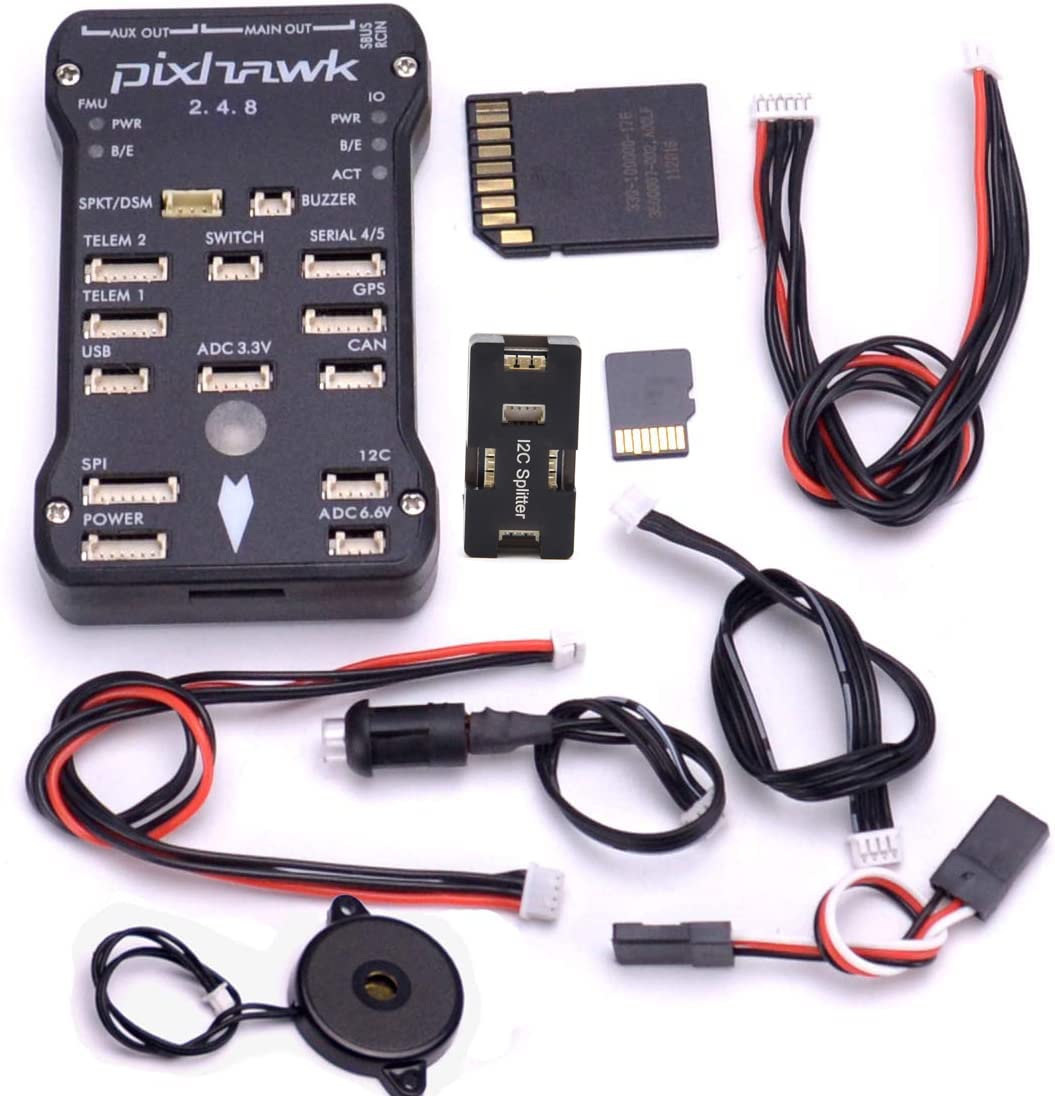
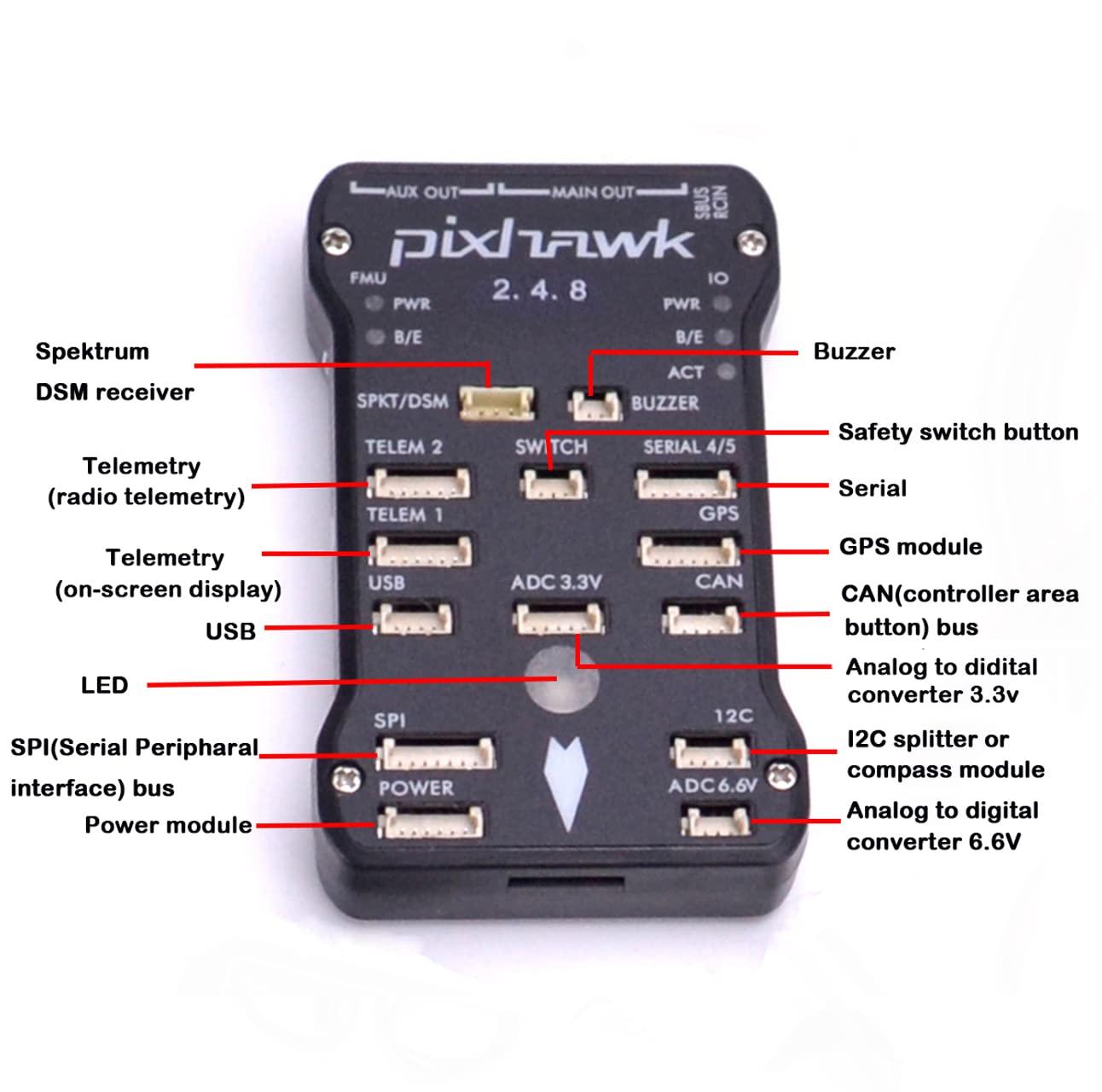
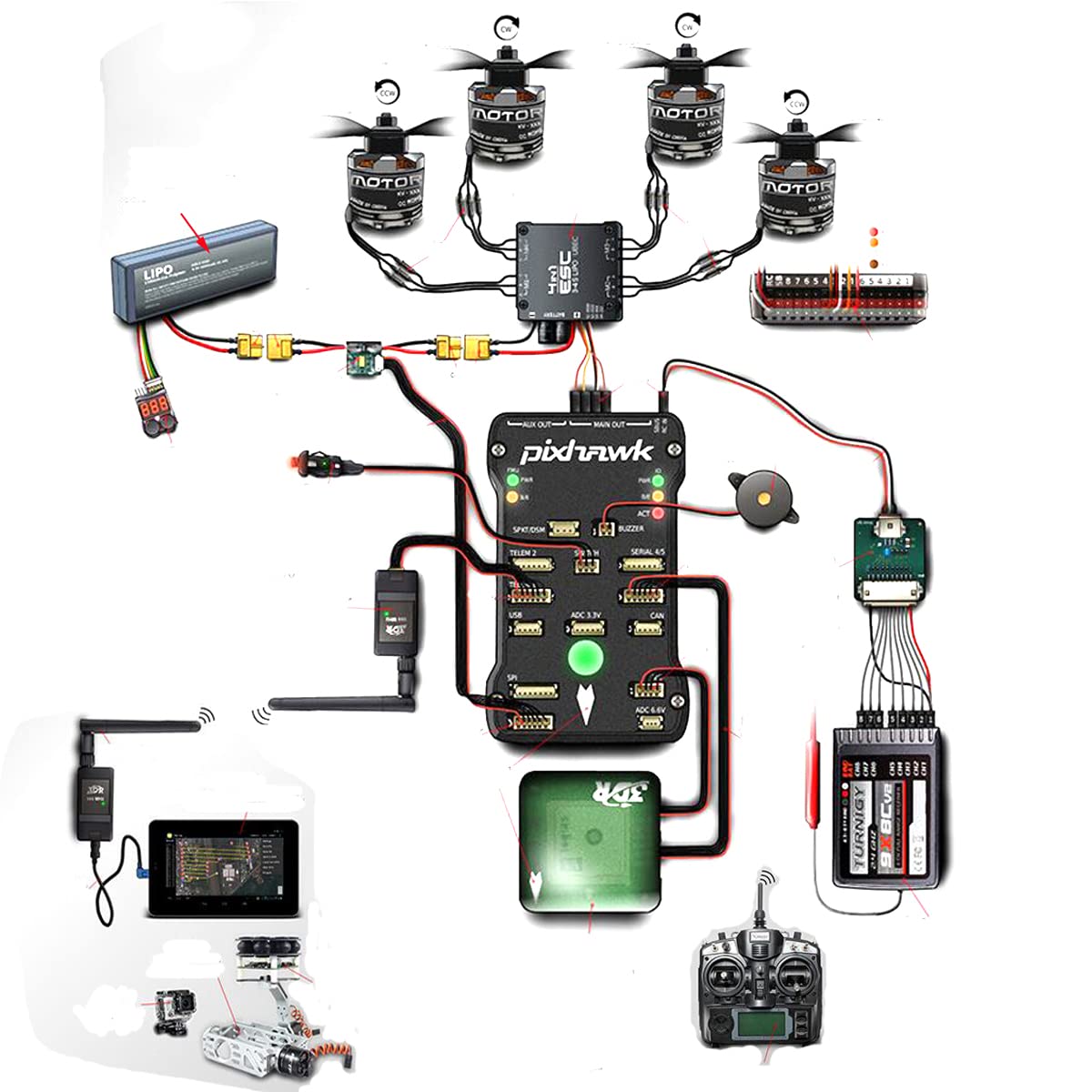
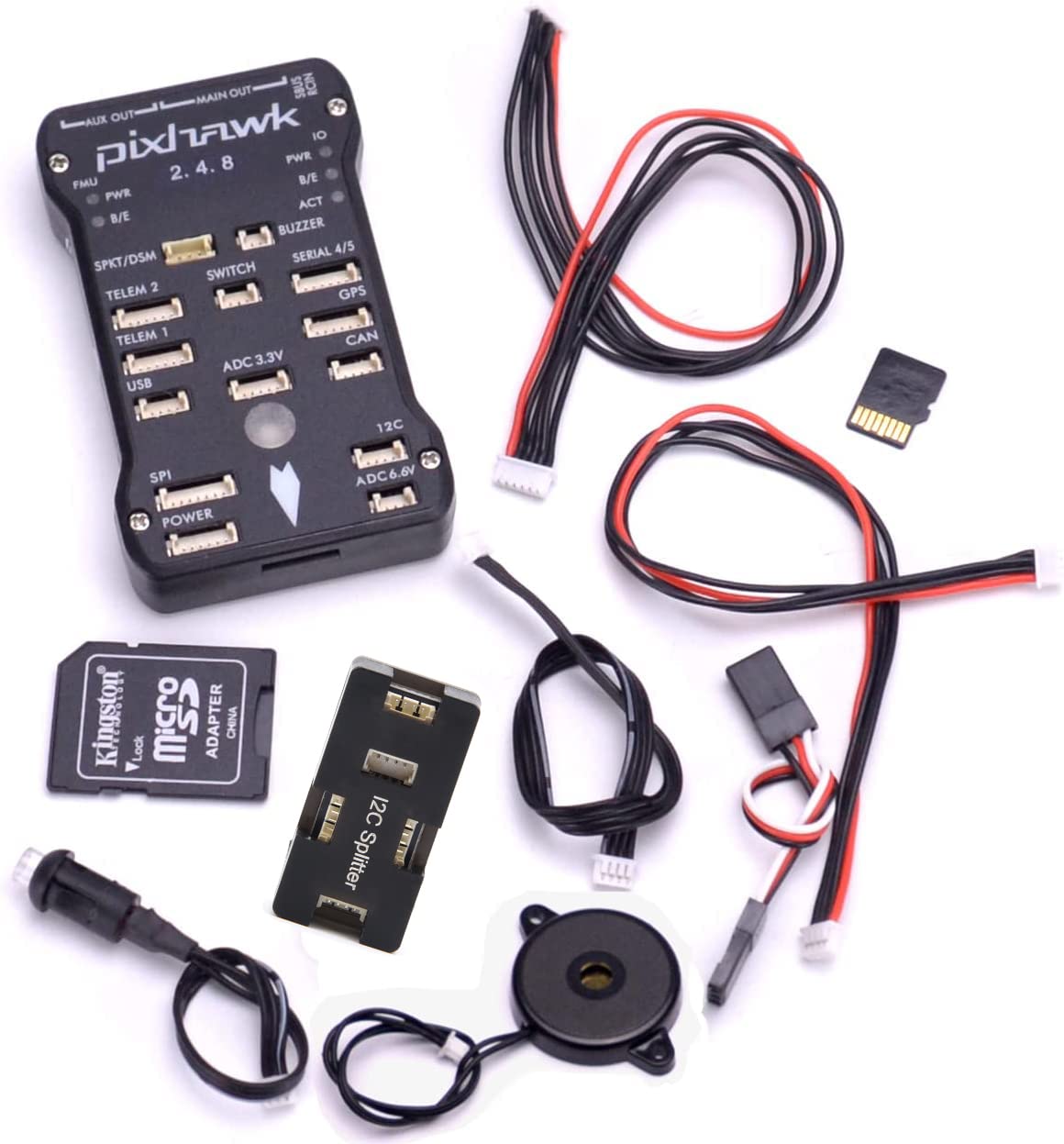
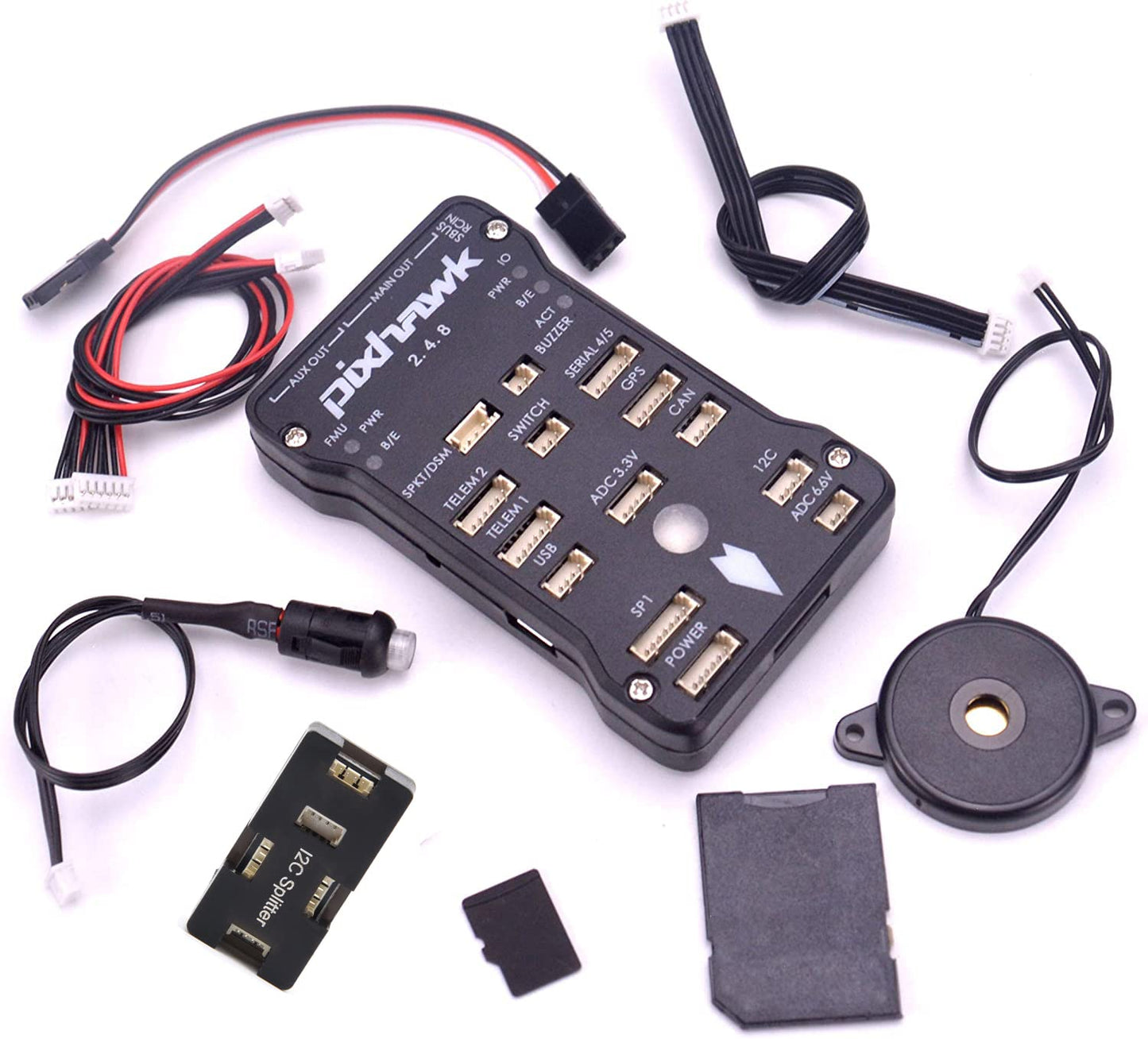
Pixhawk PX4 Autopilot PIX 2.4.8 32 Bit Flight Controller Features: 1. The advanced 32-bit ARM CortexM4 high-performance processors, can run NuttX RTOS real-time operating system; 2. 14 PWM / servo output; 3. Bus interface (UART, I2C, SPI, CAN); 4. The integrated backup power and backup controller fails, the primary controller fails over to the backup control is safe; 5. Provide automatic and manual modes; 6. Provide redundant power input and failover; 7. Multicolor LED lights; 8. Provide multi-tone buzzer Interface 9. Micro SD recording flight data; Specifications: Microprocessor 1.32 2 MB flash STM32F427 Cortex M4, with hardware floating-point processing unit 2. frequency: 168MHZ, 256K RAM 3.32 STM32F103 backup coprocessor Sensor 1.L3GD20 3-axis digital gyroscope 16 2.LSM303D 3-axis accelerometer 14 / Magnetometer 3.MPU6000 6-axis accelerometer / magnetometer 4.MS5607 precision barometer Interface 1 .5 high voltage compatible UART 1, 2 with hardware flow control 2. 2 CAN 3.Spektrum DSM / DSM2 / DSM-X satellite receiver compatible input 4.Futaba SBUS compatible inputs and outputs 5.PPM Signal Input 6.RSSI (PWM or voltage) Input 7.I2C 8.SPI 9.3.3 and 6.6VADC input 10. External MICRO USB Interface Packing list: 1 x Pixhawk 2.4.8 32bit ARM Flight Controller 1 x Original shell 1 x Pixhawk Safety Switch 1 x Pixhawk Buzzer 1 x 4G TF card(IO firmware has written) 1 x Servo cable 1 x 4pin turn 4pin cable 1 x 3pin DuPont line 1 x Pixhawk I2C Splitter Expand Module
Frequently Asked Questions
- Q: What is the main processor used in the Pixhawk PX4 Flight Controller? A: The main processor is a thirty-two bit ARM CortexM4. This high-performance processor runs the NuttX real-time operating system.
- Q: How many PWM outputs does the Pixhawk PX4 have? A: The Pixhawk PX4 supports fourteen PWM outputs. This allows for extensive control over multiple servos and devices.
- Q: What type of sensors are included with the Pixhawk PX4? A: The Pixhawk PX4 includes a three-axis digital gyroscope, a three-axis accelerometer, and a precision barometer. These sensors provide critical data for stable flight.
- Q: What is the frequency of the main processor? A: The main processor operates at a frequency of one hundred sixty-eight megahertz. This speed contributes to its efficient processing capabilities.
- Q: Does the Pixhawk PX4 offer any backup systems? A: Yes, it features a backup power and controller system. This ensures safe operation even if the primary controller fails.
- Q: How do you install the Pixhawk PX4 Flight Controller? A: To install, connect the controller to your aircraft's systems. Use the provided cables and ensure proper power connections for functionality.
- Q: Is the Pixhawk PX4 suitable for beginners? A: Yes, it can be suitable for beginners, especially with the right software tools like Mission Planner. Users should familiarize themselves with the setup process.
- Q: How do you update the firmware on the Pixhawk PX4? A: Firmware updates can be performed using a micro SD card. Download the latest firmware from the manufacturer's website and follow the installation instructions.
- Q: What is the best way to store the Pixhawk PX4 when not in use? A: Store the Pixhawk PX4 in a cool, dry place. Avoid exposure to moisture and extreme temperatures to maintain its components.
- Q: Are there any special cleaning instructions for the Pixhawk PX4? A: Yes, avoid using harsh cleaners. Use a soft, dry cloth to clean the exterior and ensure no moisture gets into electronic components.
- Q: What should I do if my Pixhawk PX4 arrives damaged? A: If the Pixhawk PX4 is damaged upon arrival, contact customer support immediately for a return or exchange. Keep all packaging for verification.
- Q: What type of warranty does the Pixhawk PX4 come with? A: The Pixhawk PX4 typically includes a limited warranty against manufacturing defects. Check the product documentation for specific details.
- Q: Can the Pixhawk PX4 connect to GPS systems? A: Yes, it is compatible with various GPS systems, including the M8N GPS. This enhances navigation and positioning capabilities during flight.
- Q: What are the power input options for the Pixhawk PX4? A: The Pixhawk PX4 provides redundant power input options. This failover capability ensures continued operation in case of primary power failure.
- Q: Is the Pixhawk PX4 compatible with other telemetry systems? A: Yes, it is compatible with the 3DR Radio Telemetry Kit. This allows for enhanced communication and control over the aircraft.